Why Are Essential Nursing Workstation Accessories Important?

Time:2026-10-20 Author:Isabella
0%

A nursing workstation is more than a desk, monitor, and rolling chair. It is where nurses verify orders, document care, answer alerts, and protect patient information. Small design failures can create large interruptions: a missing scanner, tangled cables, or a poorly placed keyboard can delay essential work.

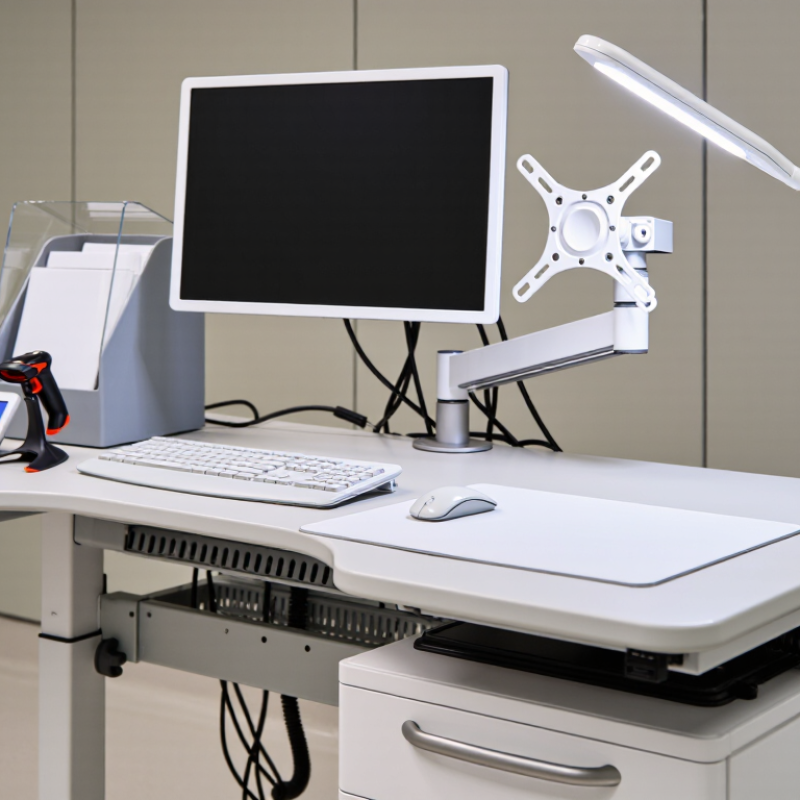
What are the essential accessories for a nursing workstation? The practical answer includes an adjustable monitor arm, ergonomic keyboard and mouse, barcode scanner, disinfectable writing surface, secure document holder, cable-management system, task light, and lockable storage. Each accessory should support safe movement, clear visibility, rapid documentation, and infection-control routines. The CDC’s Guidelines for Environmental Infection Control emphasize regular cleaning of frequently touched surfaces. That makes smooth, nonporous workstation materials more than a design preference.

Ergonomics matters, too. The U.S. Occupational Safety and Health Administration recommends neutral wrist positions, adjustable screen placement, and reduced reaching. NIOSH also identifies awkward postures and repetitive movements as preventable workplace risks. Dr. Karen Jacobs, an occupational ergonomics specialist, expresses the central principle clearly: “Design should fit the worker, not force the worker to fit the workstation.” Her point remains practical beside a busy medication cart.

Evidence is useful. Workflow still decides outcomes. A 2022 HIMSS report on clinical workflow found that documentation burden remains a major concern for healthcare professionals. Yet accessories alone cannot repair poor layout, weak training, or constant interruptions. Some “smart” features may even distract nurses. The best workstation is therefore clean, adjustable, secure, and tested by the people who use it every shift. Not perfect. Improving.
Why Are Essential Nursing Workstation Accessories Important?

Define Essential Nursing Workstation Accessories: Five Functional Categories

Why Are Essential Nursing Workstation Accessories Important?

Essential nursing workstation accessories support safer, faster bedside decisions. They reduce reaching, searching, and repeated walking. These small gains matter during a crowded twelve-hour shift.

The World Health Organization reports that about one in ten patients experiences harm in healthcare, with more than half considered preventable. A well-arranged workstation cannot prevent every error, but it can remove avoidable friction.

Define Essential Nursing Workstation Accessories: Five Functional Categories

The first category is ergonomic support, including adjustable monitor arms, document holders, and keyboard trays. The second is infection-control support, such as touch-free dispensers and cleanable storage bins. The third is documentation and power, covering cable management, charging access, and secure device stands. The fourth is organization, including labeled drawers, supply dividers, and compact waste containers. The fifth is safety and mobility, using rounded edges, stable casters, and clear floor space.

AHRQ’s Hospital Survey on Patient Safety Culture emphasizes communication, teamwork, and reliable work processes. Accessories should reinforce those behaviors, not distract from them.

Tips:

Place frequently used items within one arm’s reach. Keep clean and used materials physically separate. Check cables each shift. Test drawers with gloved hands. Ask nurses where delays actually occur; assumptions can be wrong. No setup is perfect. One overlooked detail, such as glare on a screen, may still cause fatigue or missed information. Review the arrangement after real shifts, not only during installation.

Ergonomic Rationale: OSHA Attributes 34% of Lost-Workday Injuries to MSDs

Why Are Essential Nursing Workstation Accessories Important?

Nursing workstations support charting, medication checks, and urgent communication throughout long shifts. OSHA attributes 34% of lost-workday injuries to musculoskeletal disorders (MSDs). That figure makes workstation ergonomics a safety concern, not a decoration choice. Repeated reaching, neck bending, and wrist extension can gradually produce pain and reduced concentration. The Bureau of Labor Statistics continues to identify MSDs as a major source of days-away-from-work cases.

Small accessories can change the physical demands of routine documentation. A height-adjustable monitor arm keeps the screen near eye level. A keyboard tray can reduce raised shoulders and bent wrists. A document holder prevents nurses from repeatedly twisting between paper forms and displays. Cable management also protects walking paths around mobile stations. On hard clinical floors, an anti-fatigue mat may reduce discomfort during stationary charting, although it cannot correct poor posture.

Real workplaces are less tidy than ergonomic diagrams. Equipment gets moved. Staff share stations. The best setup can fail during a busy handover. OSHA recommends evaluating work tasks, workstation design, and employee feedback together, rather than relying on one accessory. NIOSH research also emphasizes neutral postures, adjustable equipment, and reduced repetition. A practical review should observe a nurse completing real documentation, not merely sitting still. Accessories help, but training, maintenance, and honest reassessment matter just as much. One overlooked cable can undo careful ergonomic planning.

Why Are Essential Nursing Workstation Accessories Important?

Ergonomic rationale: OSHA attributes 34% of lost-workday injuries to musculoskeletal disorders (MSDs).

Ergonomic accessories such as adjustable monitor arms, height-adjustable work surfaces, document holders, and supportive seating can help reduce awkward postures and repetitive strain during clinical documentation and patient-care tasks.

Workflow Rationale: ONC Reports 96% of U.S. Hospitals Use Certified EHRs

Why Are Essential Nursing Workstation Accessories Important?

The modern nursing workstation is more than a desk with a computer. It is a control point for medication checks, clinical notes, handoffs, and patient updates. The Office of the National Coordinator for Health Information Technology reported that 96% of U.S. hospitals used certified electronic health records. Adoption reached 96% in 2021, compared with about 9% in 2008. This shift makes workstation design a workflow issue, not a decoration choice. A poorly placed keyboard, scanner, or document tray can add repeated movements during every shift.

The AHRQ Workflow Assessment for Health IT Toolkit recommends observing real tasks before changing technology or workspace layouts. That advice matters. Nurses often move between a screen, a mobile cart, printed labels, and bedside equipment within minutes. Adjustable monitor arms, cleanable cable management, and reachable supply holders can reduce unnecessary stretching and searching. However, accessories do not solve every delay. I have seen organized stations still create bottlenecks because staff were never asked how they work. The lesson feels obvious, yet it is often missed.

Tips: Place frequently used items within comfortable reach. Keep scanning areas visible and uncluttered. Choose surfaces that support infection-control cleaning. Test the setup during a busy shift, not only during a quiet inspection. Record staff feedback, including complaints that seem minor. Small friction can become a recurring safety risk.

Infection-Control Rationale: CDC Says Hand Hygiene Can Prevent About 30% of HAIs

Essential nursing workstation accessories support infection control because they shape every hand movement.

A wall-mounted sanitizer dispenser, touch-free waste bin, disposable glove holder, and cleanable document tray keep supplies within reach. The CDC commonly associates consistent hand hygiene with preventing about 30% of healthcare-associated infections. That figure matters at the bedside, where a nurse may touch a chart, monitor, drawer handle, and patient within minutes.

30%
healthcare-associated infections potentially prevented through consistent hand hygiene

The World Health Organization’s 2022 Global Report on Infection Prevention and Control found that strong infection-control programs can reduce healthcare-associated infections by up to 70%. However, equipment placement can weaken good policy. If sanitizer sits behind a monitor, staff may skip it during a busy medication round. A visibly empty dispenser is worse. Small design failures become repeated exposure points.

The CDC reports that about one in 31 hospital patients has at least one healthcare-associated infection on any given day. A smooth, nonporous workstation surface allows faster cleaning between tasks. Separate holders for clean and used items reduce accidental contact. Color-coded containers can also make disposal decisions clearer, although color systems require staff training.

I have seen well-designed stations still fail when accessories become cluttered. That is the uncomfortable lesson: infection control depends on behavior, maintenance, and layout—not accessories alone.

Sources: CDC, Hand Hygiene in Healthcare Settings and NHSN HAI Data; WHO, Global Report on Infection Prevention and Control, 2022.

Selection Framework: Rank Safety, Usability, Interoperability, and Total Cost

Essential nursing workstation accessories should be selected by risk, not appearance. The World Health Organization estimates that one in ten patients experiences harm during healthcare, with more than half considered preventable. That makes rounded edges, secure cable routing, stable monitor arms, and cleanable surfaces practical safety controls. The CDC also reports that about one in 31 hospital patients has a healthcare-associated infection on any given day. A smooth, sealed accessory surface can reduce hidden contamination points. It cannot replace hand hygiene.

Usability comes next. Nurses should adjust screens without stretching, read labels under bright light, and reach supplies without twisting. Small delays matter during medication preparation. A 2023 interoperability report from the Office of the National Coordinator for Health IT found that roughly 70% of hospitals engaged in all four major interoperability domains. Accessories should support that exchange through compatible mounts, power connections, scanners, and device positioning. Compatibility is not always interoperability. That distinction is easy to miss.

Total cost should include cleaning time, repairs, replacement parts, training, and workflow disruption. A cheaper tray may crack sooner or consume valuable minutes each shift. A higher-priced accessory may still fail if staff avoid using it. Measure actual use for several weeks. Revise the scorecard. It will not be perfect. Feedback from night-shift nurses often exposes problems that daytime inspections miss. Test one workstation before wider deployment, document failure points, and compare lifecycle costs rather than purchase prices alone.

Why Are Essential Nursing Workstation Accessories Important? — Selection Framework: Rank Safety, Usability, Interoperability, and Total Cost
Priority Accessory or Feature Primary Purpose Safety
(30%)
Usability
(25%)
Interoperability
(20%)
Total Cost
(25%)
Weighted Score
(100)
Typical Evaluation Criteria
1 Medical-grade power and cable-management system Reduce electrical, trip, and disconnection hazards 5.0 4.0 4.0 4.0 4.35 Grounded outlets, overload protection, secured cables, easy inspection, and compatibility with clinical devices
2 Adjustable monitor and keyboard arm Support neutral posture and reduce musculoskeletal strain 4.5 5.0 4.0 4.0 4.40 Height and tilt range, smooth adjustment, stable locking, seated and standing use, and cleanability
3 Hand-hygiene and disinfectant holder Make hand hygiene and surface disinfection immediately accessible 5.0 4.5 3.5 4.5 4.45 One-handed access, leak resistance, compatibility with approved disinfectants, refill visibility, and wipeable surfaces
4 Lockable clinical supply drawer or medication tray Organize supplies and restrict access to sensitive items 4.5 4.0 4.0 4.0 4.15 Controlled access, smooth-cleanable construction, labeling space, load capacity, and compatibility with workflow layout
5 Barcode scanner holder and device charging dock Support accurate identification and reliable device availability 4.0 4.5 5.0 4.0 4.40 USB or network compatibility, secure placement, charging status visibility, easy cleaning, and reduced scanning interruptions
6 Integrated privacy screen or monitor hood Limit unauthorized viewing of patient information 4.5 4.0 4.0 3.5 4.00 Viewing-angle reduction, screen accessibility, glare control, cleanability, and compatibility with monitor size
7 Mobile workstation wheels with reliable locking casters Enable controlled movement without unintended rolling 5.0 4.0 4.0 4.0 4.35 Brake performance, quiet movement, floor compatibility, load rating, directional control, and serviceability
8 Clinical waste and sharps-container mounting bracket Keep waste disposal close while reducing spill and handling risks 5.0 4.0 4.0 4.0 4.35 Stable mounting, puncture-resistant container compatibility, safe removal, cleanability, and clearance from patient surfaces
9 Height-adjustable document and writing surface Support bedside documentation and reduce awkward reaching 4.0 4.5 4.0 4.5 4.25 Height range, rounded edges, cleanable finish, stable work area, and sufficient space for clinical documentation
10 Asset label, cable identification, and equipment-status panel Improve equipment traceability and reduce setup errors 4.0 4.0 4.5 4.5 4.20 Readable labeling, standardized identifiers, replaceable labels, visibility during rounds, and support for maintenance checks
Scoring method: Each criterion is rated from 1 (poor) to 5 (excellent). The weighted score prioritizes safety at 30%, usability at 25%, interoperability at 20%, and total cost of ownership at 25%. Total cost includes purchase, installation, cleaning, maintenance, replacement parts, training, and expected service life. Final selection should be validated against the facility’s infection-prevention procedures, electrical requirements, ergonomic assessment, information-security policy, and clinical workflow.

FAQS

Why are ergonomic accessories important at nursing workstations?

They can reduce repeated reaching, neck bending, and wrist extension during long shifts.

Which accessory helps maintain a neutral viewing position?

A height-adjustable monitor arm keeps the screen near eye level.

How can a keyboard tray support safer work?

A keyboard tray can reduce raised shoulders and bent wrists.

Why is a document holder useful?

It keeps paper forms near the screen and reduces repeated twisting.

How do accessories improve nursing workflow?

Reachable supply holders, visible scanning areas, and cable management reduce searching and unnecessary movement.

What workstation features support infection control?

Smooth, nonporous surfaces allow faster cleaning between tasks.

Can accessories prevent healthcare-associated infections by themselves?

No.

Are anti-fatigue mats always necessary?

They may reduce discomfort during stationary charting on hard floors.

How should a facility evaluate its workstation accessories?

Observe real documentation, handoffs, scanning, and supply retrieval.

Conclusion

Essential nursing workstation accessories are practical tools that support safe, efficient, and comfortable clinical work. What are the essential accessories for a nursing workstation? They generally fall into five functional categories: ergonomic supports, documentation and computing tools, organization solutions, infection-control supplies, and safety or mobility accessories. Each category helps nurses reduce physical strain, maintain an orderly workspace, access electronic health records efficiently, and follow essential hygiene procedures.

Their importance is supported by workplace, workflow, and infection-control considerations. Musculoskeletal disorders account for a significant share of lost-workday injuries, making adjustable and supportive equipment valuable for reducing strain. Since certified electronic health records are widely used in hospitals, compatible documentation accessories can improve accuracy and workflow continuity. Hand-hygiene supplies and easy-to-clean surfaces also support efforts to reduce healthcare-associated infections. When selecting accessories, healthcare facilities should prioritize safety first, followed by usability, interoperability, durability, and total cost of ownership. A thoughtful selection process helps create a workstation that supports both patient care and staff well-being.

Isabella

Isabella

Isabella is a dedicated marketing professional with a sharp focus on driving brand growth and engagement through strategic content creation. With an extensive background in digital marketing, she combines her passion for storytelling with her keen understanding of industry trends to deliver......